

One of the great pleasures of owning a Mac in 2026 is how far free software has come. There was a time when “free app” meant a crippled trial or a donation-ware experiment; today, some of the best Mac software in every category — browsers, editors, utilities, security tools — costs exactly nothing, is actively maintained, and respects your privacy. The hard part isn’t finding free apps. It’s finding the ones worth your disk space among thousands of options.
Short on space already? CleanMac finds junk, leftover apps, and duplicates on your Mac — and shows you exactly what it will remove before anything is deleted. Download free →
This list is our curated answer: the free Mac apps we think genuinely belong on every machine, organized by category, each with a plain explanation of what it does and why it earns its place. We’ve included CleanMac — our own free Mac cleaner — in the utilities section, and we’ve been transparent about why it belongs there. Everything else on this list we have no stake in whatsoever; it’s simply what we’d install on a family member’s new Mac.
Productivity
Rectangle — macOS still refuses to give windows proper keyboard snapping, and Rectangle fixes it permanently. Drag windows to screen edges for halves and quarters, or memorize a handful of shortcuts and arrange your workspace without touching the mouse. It’s open source, lightweight, and within a week it becomes muscle memory you can’t work without.
Obsidian — if you take notes of any complexity, Obsidian is the free tier of a genuinely excellent tool: plain-text Markdown notes stored as local files (so you own your data forever), linked together into a personal knowledge base. Sync is a paid add-on, but iCloud Drive syncs your vault for free.
LibreOffice — the answer to “how do I open a Word document without paying for Microsoft 365.” It handles Word, Excel, and PowerPoint files capably, costs nothing, and has no subscription to lapse. For occasional office-document needs, it removes a recurring bill from your life.
Bitwarden — a password manager is not optional in 2026, and Bitwarden’s free tier is the best one available: unlimited passwords, sync across unlimited devices, open-source code that’s been independently audited. Reused passwords are how accounts get compromised; a free, trustworthy manager removes the excuse.
Utilities
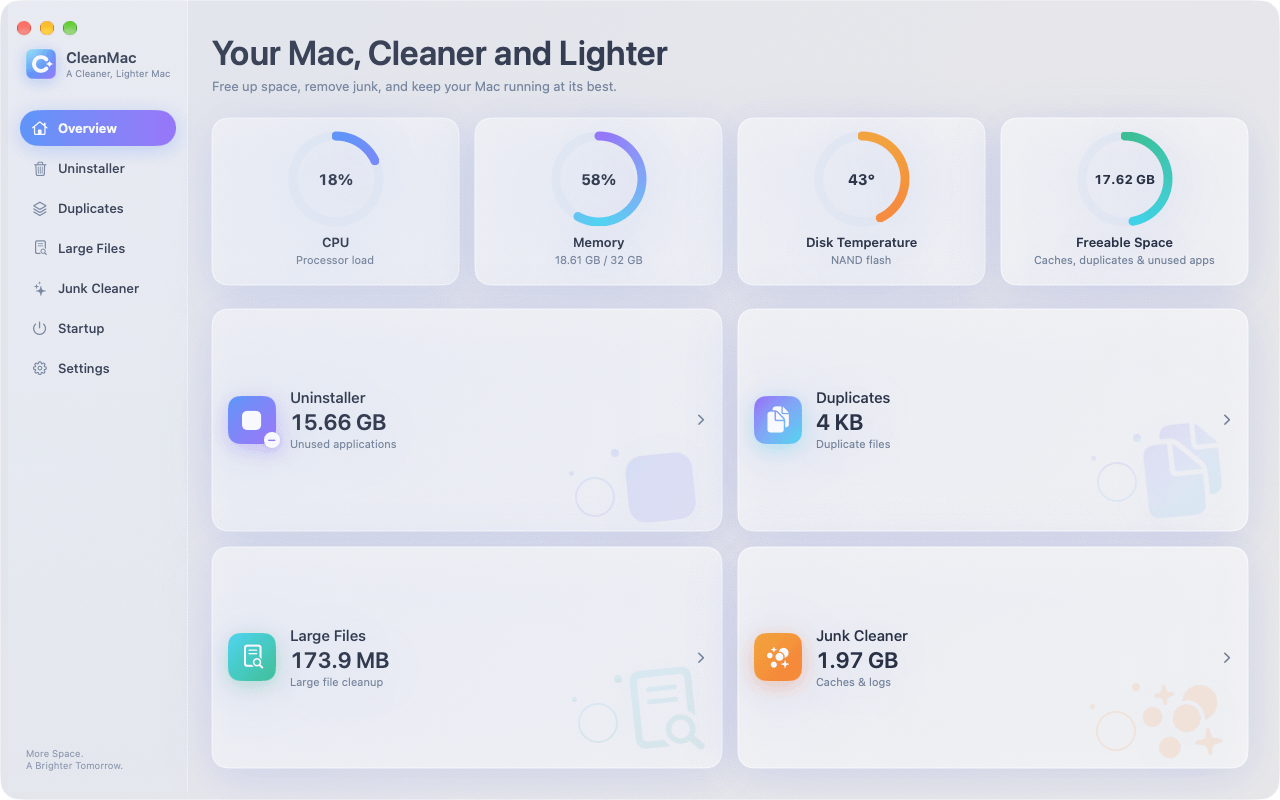
CleanMac — full disclosure: this is our app, and we built it because we thought the market needed it. Mac cleaning was dominated by $40/year subscriptions for functionality that costs nothing to deliver, so CleanMac makes the six core maintenance features completely free: junk cleaning, complete app uninstallation with leftovers, content-hash duplicate finding, large file cleanup, startup item management, and a live system dashboard. Everything runs locally, there’s no account, nothing uploads, and all deletion is preview-first and Trash-based. If your disk ever fills up or your Mac ever boots slowly, this is the tool we made for exactly that moment.
The Unarchiver — macOS opens ZIP natively but stumbles on RAR, 7z, and older formats. The Unarchiver opens essentially everything, is free on the App Store, and has been the default answer to this problem for over a decade.
AppCleaner — a tiny, single-purpose tool: drag an app onto it and it finds the associated preference and support files so you can delete them together. For users who want leftover-aware uninstalling in a standalone minimal package, it’s a classic. (CleanMac’s Uninstaller covers the same ground with size sorting and unused-app detection if you prefer one consolidated maintenance app.)
Hidden Bar — menu bar icons breed until your menu bar is unusable, especially on a notched MacBook. Hidden Bar collapses the ones you rarely need behind a toggle. Free, open source, thirty seconds to set up.
Stats — a free, open-source menu bar system monitor: CPU, memory, disk, network, battery, sensors. If you’ve ever wondered “what is my Mac doing right now,” Stats answers it from the menu bar permanently. (CleanMac’s dashboard covers the same ground during cleaning sessions; Stats is for always-on monitoring.)
Browsers and Communication
Firefox — the last major browser not built on Google’s Chromium engine, which makes it structurally important for the health of the open web, in addition to being fast, private, and excellent. Its container tabs — isolating sites into separate cookie jars — remain the best mainstream anti-tracking feature anywhere.
Brave — if you want Chromium compatibility with aggressive built-in ad and tracker blocking, Brave is the polished option. Pages load noticeably faster when they aren’t hauling thirty trackers.
Security
Malwarebytes Free — the on-demand scanner for the moment something feels wrong: a suspicious browser redirect, an unfamiliar profile, a weird background process. The free version scans and removes on demand (real-time protection is the paid tier), and its Mac adware definitions are excellent. Pair it with the hygiene of reviewing Login Items periodically — CleanMac’s Startup Items module makes that review a two-minute job.
Lulu — a free, open-source outbound firewall from Objective-See. macOS’s built-in firewall controls incoming connections; Lulu alerts you when any app tries to phone out, and lets you block it. It’s the single most revealing security tool you can install — you’ll be surprised who calls home.
Creativity and Media
GIMP — the veteran free Photoshop alternative. The interface shows its age, but for real image editing without a subscription, it delivers layers, masks, filters, and scripting at zero cost.
Inkscape — the same story for vector graphics: a free Illustrator alternative that’s genuinely capable for logos, diagrams, and illustration.
DaVinci Resolve — the astonishing entry on this list: a Hollywood-grade video editor and color suite whose free version is not a trial and not crippled — it’s the actual tool, used professionally, missing only some advanced studio features. If you edit video at all, nothing else free comes close.
Audacity — the free audio editor of record for two decades: recording, cutting, cleanup, format conversion. Podcasters and musicians start here for a reason.
VLC — plays every video and audio format in existence, including ones you’ve never heard of, without codecs packs or complaints. Install it once; never think about formats again.
Putting It Together
A sensible starter kit from this list: Bitwarden and Lulu for security, Rectangle and Hidden Bar for daily ergonomics, The Unarchiver and VLC for file pragmatics, Firefox or Brave alongside Safari, and CleanMac for the maintenance layer that keeps everything else running on a healthy disk. That’s a fully equipped Mac for zero dollars — and it’s a kit you can assemble in under an hour, since every app on this list installs cleanly, asks for no account beyond the ones that genuinely need sync, and respects the macOS conventions that make apps feel native.
A word on installation discipline, because it connects this list back to the maintenance theme: install for actual needs, not hypothetical ones. Every app you add is one you’ll either use weekly or eventually have to remove — and apps you install “just in case” are precisely the ones that clutter startup lists, hold gigabytes of cached data, and get forgotten until a cleanup flags them. The ten-minute monthly habit of reviewing what you actually open, and removing what you don’t, keeps even a generous app collection healthy indefinitely.
Conclusion
Free Mac software in 2026 is not a compromise — in category after category, the free option is the best option outright, or close enough that the paid alternative is hard to justify. The essentials: a password manager (Bitwarden), window management (Rectangle), an outbound firewall (Lulu), format insurance (The Unarchiver, VLC), and a maintenance layer to keep the machine itself healthy — which is why we built CleanMac to be free forever, with junk cleaning, uninstalling, duplicates, large files, and startup management all included. Install the kit, spend the money you saved on hardware, and enjoy one of the best eras free software has ever had. For more free Mac utilities, browse our app collection.
Frequently Asked Questions
What are the best free Mac apps in 2026?
The essentials most users benefit from: Bitwarden for passwords, Rectangle for window management, The Unarchiver for compressed files, VLC for media playback, Firefox or Brave as a second browser, Lulu for outbound connection monitoring, and CleanMac for system maintenance — junk cleaning, complete app uninstallation, duplicate finding, and startup management, all free. For creative work, DaVinci Resolve, GIMP, Inkscape, and Audacity cover video, image, vector, and audio editing at no cost.
Are free Mac apps safe to install?
Free apps from reputable sources are safe; the risk comes from where you download, not the price. Prefer the Mac App Store or the developer’s official website, check that open-source projects have active maintenance and public code, and be suspicious of free apps that arrive via ads or download aggregators. Every app on this list is either open source, from an established developer, or both.
Do I really need a password manager?
Yes — password reuse is the single most common way personal accounts get compromised, because a breach at one site exposes your password everywhere you reused it. A password manager generates and stores a unique password per site, so one breach affects exactly one account. Bitwarden’s free tier provides unlimited passwords and cross-device sync, removing any cost barrier to doing this properly.
What free app should I use to clean my Mac?
CleanMac is our recommendation — and our product — because it makes the six core cleaning features completely free with no subscription or trial: junk cleaning, app uninstallation with leftover removal, content-hash duplicate finding, large file cleanup, startup item management, and a system dashboard. It runs entirely locally with no account, previews everything before deletion, and deletes to the Trash so mistakes are recoverable.
Is DaVinci Resolve really free, or is it a trial?
It’s genuinely free — not a trial, and not time-limited. Blackmagic Design ships the full professional editor, color grading suite, and audio post tools in the free version, using it as the entry point to sell the Studio upgrade and hardware. The Studio version adds features like certain effects, HDR grading tools, and multi-user collaboration, but the free version is the actual production tool used on professional work.
What free Mac apps help with window management?
Rectangle is the standard answer — free, open source, and providing edge-drag snapping plus keyboard shortcuts for halves, thirds, quarters, and full-screen arrangements. Its predecessor Spectacle is no longer maintained, and macOS’s built-in tiling added in Sequoia covers basic halves but lacks Rectangle’s shortcut depth. Hidden Bar complements it by keeping menu bar clutter collapsed.
How many of these apps do I actually need to install?
A sensible core is six: a password manager, a window manager, an unarchiver, a media player, a second browser, and a maintenance tool like CleanMac. Add the security pair (Malwarebytes Free, Lulu) if you want visibility into what your Mac connects to, and add creative tools only as your projects demand them. Installing everything at once is its own form of clutter — install for actual needs, and let CleanMac’s unused-app detection flag what you stop opening.


