
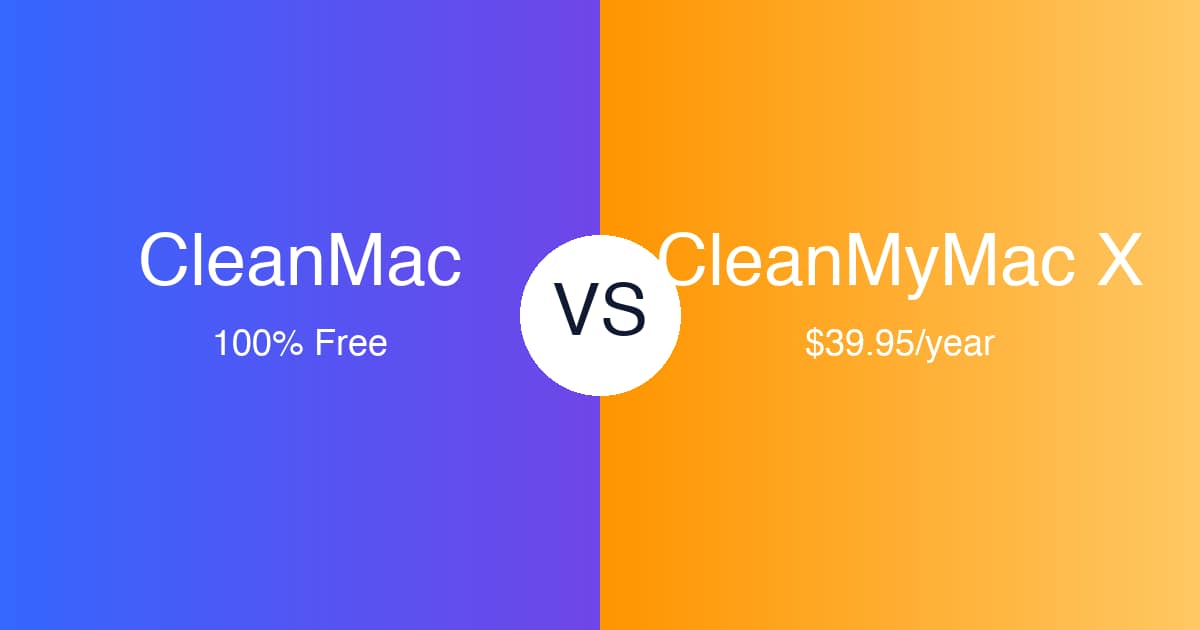
CleanMyMac X is probably the best-known Mac cleaner on the market. It has been around for years, it’s beautifully designed, and MacPaw’s marketing makes it almost impossible to miss. But there’s a catch that catches everyone eventually: it costs $39.95 per year for a single Mac — and that’s a subscription, not a purchase. The one-time license runs around $89.95, which is even harder to swallow for what is, at its core, a utility that deletes files you don’t need.
If you opened this page because the renewal email just landed in your inbox, or because the trial scanned your Mac and then asked for money before it would clean anything, you’re not alone. Thousands of Mac users go looking for a CleanMyMac X alternative every month, and most of them want the same thing: the core cleaning features without the annual bill.
That’s where CleanMac comes in. It’s a full-featured Mac cleaner — junk cleaning, complete app uninstaller, duplicate finder, large file cleanup, startup manager, and a live system dashboard — that is 100% free, with no subscription, no trial period, and no in-app purchases. In this article we’ll compare CleanMac and CleanMyMac X honestly: what each does better, who should switch, who shouldn’t, and exactly how to make the move.
Why Look for a CleanMyMac X Alternative?
CleanMyMac X is not a bad product — far from it. But there are four very common, very legitimate reasons people start searching for something else.
The price adds up fast
$39.95 per year doesn’t sound dramatic until you do the math. Over five years, a CleanMyMac X subscription costs roughly $200 — more than many people spend on any other Mac software, ever. If you own two Macs, the multi-Mac plan costs more. And because it’s a subscription, the day you stop paying, the app stops being useful.
Subscription fatigue is real
Modern software wants everything to be a subscription: your password manager, your photo editor, your to-do list, your VPN. Each one is “just a few dollars,” and together they’re a second utility bill. A disk cleaner — a tool you might run once or twice a month — is exactly the kind of software people refuse to keep renting. Utilities should earn a one-time purchase or be free; they rarely justify a permanent line item in your budget.
Most people only need the basics
CleanMyMac X bundles a lot: Smart Scan, cleanup, malware removal, optimization scripts, an uninstaller, an updater, a file shredder, a menu bar monitor, and more. But watch what most users actually do with it: they clear system junk, uninstall apps they no longer want, and hunt for large files. If 80% of your usage is three features, paying for the full suite every year is poor value — especially when a free tool covers those three features completely.
Privacy and data handling
A cleaner app reads your entire disk. That makes trust non-negotiable. CleanMyMac X is a reputable product from an established company, but it does include analytics and online components, requires activation, and its account/licensing system phones home. Some users simply prefer a cleaner that works entirely offline: no account, no activation, nothing leaving the machine. That preference used to mean compromising on features. It no longer does.
What Is CleanMac?
CleanMac is a free Mac cleaner built around a simple promise: every feature, free, forever. There is no “Pro” tier, no trial countdown, no feature locked behind a paywall, and no subscription of any kind. Updates are free too.
It runs on macOS 13 Ventura or later, natively on both Intel and Apple Silicon Macs, and ships six modules in one lightweight app:
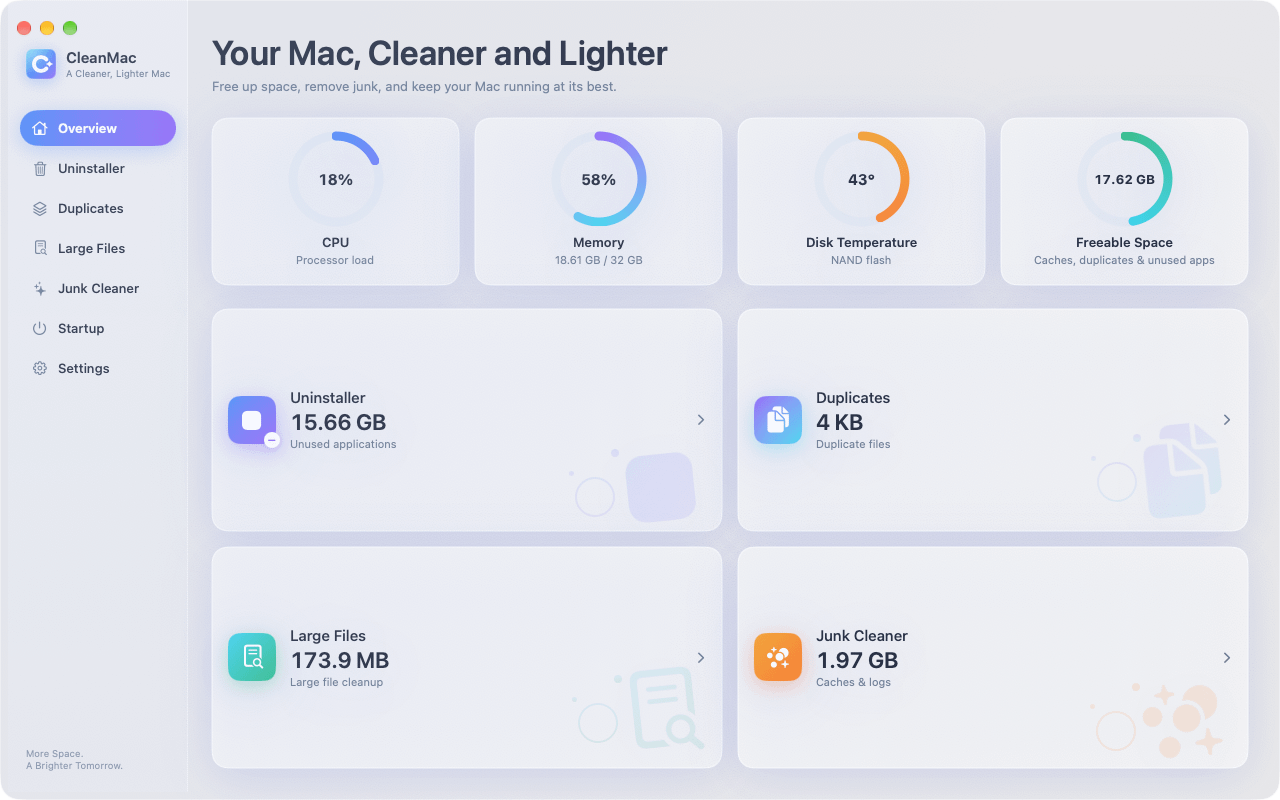
- System Overview dashboard — a live readout of CPU load, memory pressure, disk temperature, and how much space is freeable right now. It doubles as a before/after health check when you clean.
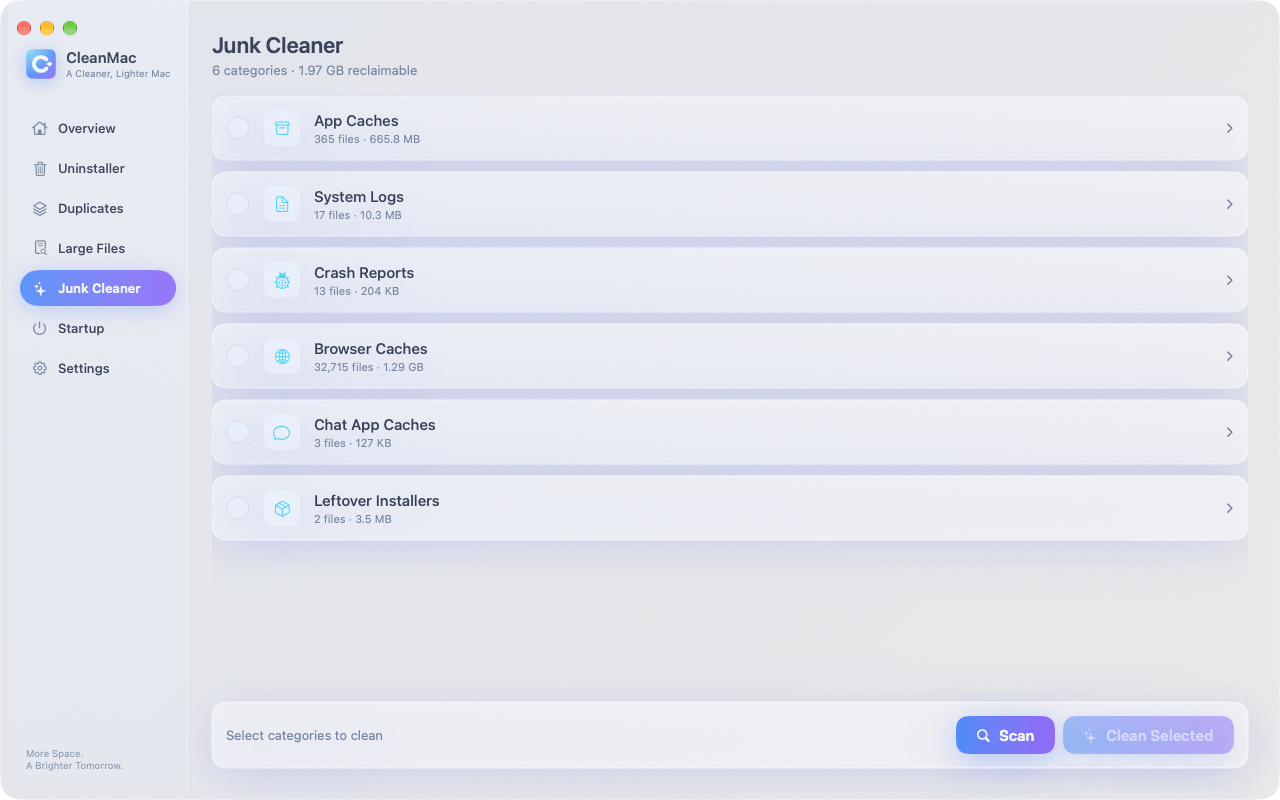
- Junk Cleaner — removes app caches, system logs, crash reports, browser caches, chat app caches, and leftover installer packages. On a well-used Mac, a first scan typically finds anywhere from 5 GB to 15 GB of safe-to-remove junk.
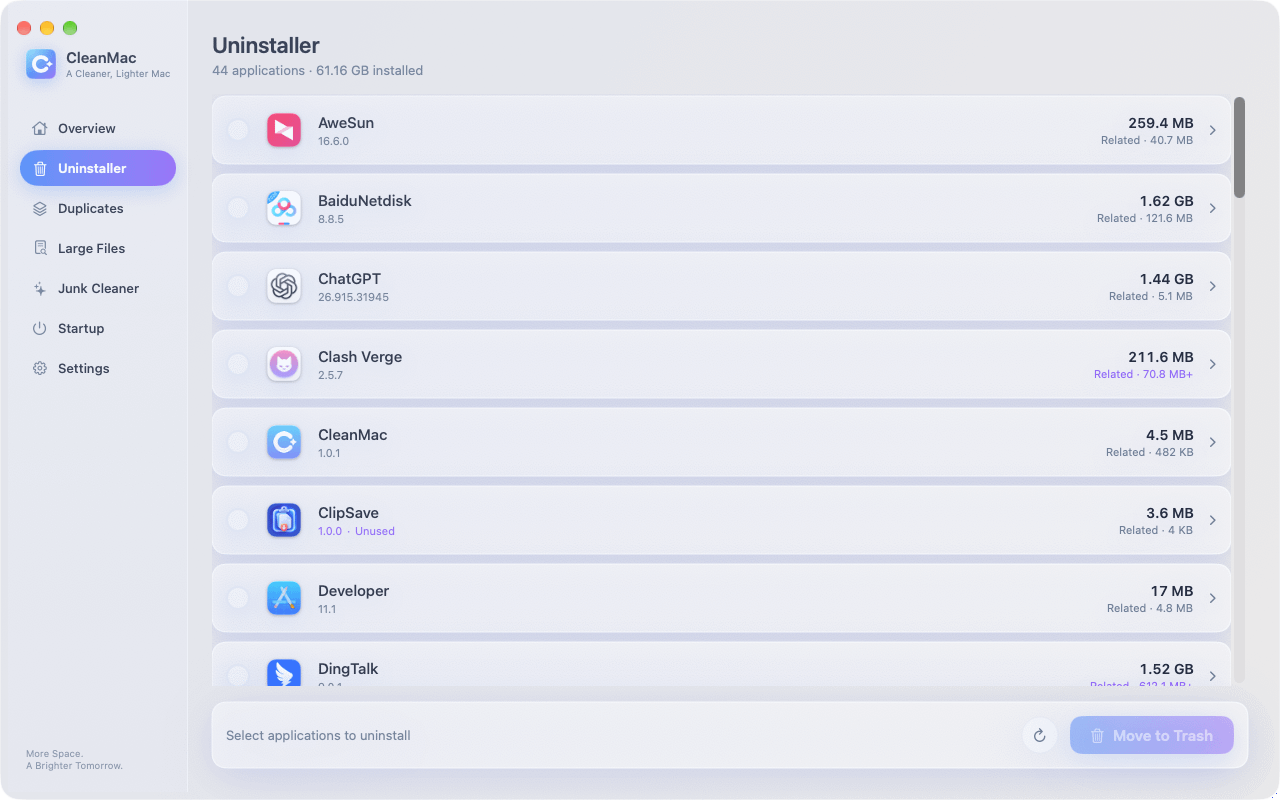
- Complete App Uninstaller — deletes apps together with their support files, caches, preferences, and containers that a simple drag-to-trash leaves behind. It also flags apps you haven’t opened in 30+ days.
- Duplicate File Finder — compares files by content, not just name, shows duplicates side by side, and always keeps one copy safe.
- Large File Cleanup — surfaces files of 10 MB or more, sorted by size, so you can find that forgotten 4 GB screen recording in seconds.
- Startup Item Manager — lists launch agents and daemons and lets you disable or remove whatever slows down your login.
Two design decisions define the app. First, everything is local: scans run entirely on your Mac, there’s no account to create, nothing is uploaded, and no analytics touch your files. Second, safety comes first: every result is a preview, you choose exactly what to remove, and selected items go to the Trash — not into permanent deletion — so you can recover from a mistake.
The app is localized in 11 languages (English, Simplified and Traditional Chinese, Japanese, Korean, German, French, Spanish, Italian, Turkish, and Thai), offers Light and Dark mode, and supports custom scan folders.
CleanMac vs CleanMyMac X: Head-to-Head Comparison
Here’s how the two apps stack up on the things that matter:
| Category | CleanMac | CleanMyMac X |
|---|---|---|
| Price | 100% free — all features, forever | $39.95/year subscription (or ~$89.95 one-time) |
| Free trial | Not needed — everything is free | Trial scans but limits cleaning |
| Junk cleaning | ✅ Full-featured | ✅ Full-featured |
| Complete app uninstaller (with leftovers) | ✅ | ✅ |
| Duplicate file finder | ✅ | ✅ (via Space Lens / cleanup modules) |
| Large file cleanup | ✅ | ✅ |
| Startup item manager | ✅ | ✅ (Optimization module) |
| System dashboard | ✅ CPU, memory, disk temp, freeable space | ✅ Menu bar monitor |
| Malware removal | ❌ | ✅ |
| File shredder (secure erase) | ❌ | ✅ |
| App updater | ❌ | ✅ |
| UI polish and animations | Good, clean and functional | Excellent, best-in-class |
| Privacy model | 100% local, no account, no uploads | Online activation; analytics components |
| Safety model | Preview-first, deletes to Trash | Preview-first; some modules erase directly |
| Track record | Newer app | Established since 2008 |
| Customer support | Community / email | Dedicated support team |
| Languages | 11 | 13+ |
| macOS requirement | macOS 13 Ventura or later | macOS 10.13 or later |
The honest summary: for the four tasks most people use a cleaner for — junk, uninstalling, duplicates, and large files — the two apps are functionally comparable. CleanMyMac X pulls ahead on breadth (malware removal, shredder, updater) and polish. CleanMac pulls ahead on price, privacy, and simplicity.
What CleanMac Does Better
It’s genuinely, completely free. Not “free to scan,” not “free for 14 days,” not “free with a watermark.” All six modules work from the first launch and keep working forever. Over five years, that’s roughly $200 that stays in your pocket compared to a CleanMyMac X subscription.
It’s private by design. CleanMac never asks for an account, never activates online, and never uploads anything — you can verify it yourself with any network monitor: zero outbound connections during scanning and cleaning. For an app that reads your whole disk, local-only processing is the strongest privacy guarantee available.
It’s lightweight and focused. CleanMac doesn’t install a menu bar agent, doesn’t run background monitors, and doesn’t prompt you to buy anything. It opens fast, scans fast, and gets out of the way. If subscription fatigue and notification fatigue are part of why you’re leaving CleanMyMac X, this is the antidote.
Trash-based deletion. When CleanMac removes files, they go to the Trash first. If anything misbehaves after a cleanup — which is rare, but possible with any cleaner — you can restore everything with one click. It’s the safest deletion model in the category.
Unused-app detection. The uninstaller’s 30+ days unused view is a genuinely smart way to find dead weight, and it works batch-style, so reclaiming space from abandoned apps takes minutes instead of an afternoon.
What CleanMyMac X Does Better
An honest comparison has to give CleanMyMac X its due. There are real reasons it has dominated this category for years.
Malware removal. This is CleanMyMac X’s biggest functional advantage. Its Protection module scans for Mac-specific malware, adware, and potentially unwanted programs, and removes them. CleanMac deliberately doesn’t include an antivirus engine — if malware scanning is a must-have in your cleaner, CleanMyMac X (or a dedicated tool like Malwarebytes) is the way to go.
Interface polish. CleanMyMac X is one of the most beautifully designed Mac apps ever made — the animations, the sound design, the visual feedback during scans. CleanMac’s interface is clean and functional, but it’s not going to win design awards. If a delightful UI genuinely improves how often you maintain your Mac, that has real value.
Track record and trust. MacPaw has been shipping Mac software since 2008. CleanMyMac X has been through years of macOS transitions, is notarized by Apple, and has an enormous user base that has stress-tested every edge case. CleanMac is the newer app; its approach is sound, but it hasn’t had fifteen years in the field.
Support and extras. CleanMyMac X comes with a real support team, a detailed knowledge base, an app updater module, a file shredder for secure deletion, and a menu bar monitor for real-time system stats. If you want one vendor to handle maintenance end-to-end — and humans to email when something goes wrong — the subscription buys you that.
Who Should Choose CleanMac?
CleanMac is the right call if any of these sound like you:
- You’re tired of subscriptions. You want a utility you own outright — or in this case, one that simply never charges you — and you’ll never see a renewal email again.
- You mainly need the core four. Junk cleaning, complete uninstalling, duplicate finding, and large file cleanup cover the vast majority of real-world cleaning. CleanMac does all four as well as anything you can pay for.
- Privacy is a priority. You don’t want a disk-level utility tied to an account, an activation server, or analytics. CleanMac works fully offline.
- You’re setting up Macs for family. Installing a $39.95/year subscription on your parents’ or kids’ Macs is a hard sell. Installing a free, safe, Trash-based cleaner is an easy one.
- You pair tools. You’re happy to use macOS’s built-in XProtect for malware and a free on-demand scanner when needed, and you’d rather keep $40/year.
If that profile fits, download CleanMac free and run your first scan — it takes about a minute to see what you’ve been carrying around.
Who Should Stick With CleanMyMac X?
Stay with CleanMyMac X if:
- You want built-in malware removal in the same app as your cleaner, and you don’t want to manage a separate security tool.
- You genuinely use the extras — the updater, the shredder, the menu bar monitor, the optimization scripts — several times a week.
- You value the design. The polish isn’t superficial for everyone; if it makes maintenance feel effortless, it’s doing a job.
- You want a company behind it. Dedicated support, a long track record, and a vendor that’s been through every macOS transition since 2008.
- $39.95/year simply doesn’t matter to you. For a primary work machine, some people reasonably decide that the best-known tool with full support is worth a line item.
There’s no wrong answer here — it’s a value calculation, and now you have both sides of it.
How to Switch From CleanMyMac X to CleanMac (3 Steps)
Switching takes about five minutes. Here’s the clean way to do it.
Step 1: Cancel your CleanMyMac X subscription
Before anything else, stop the next renewal. If you subscribed through MacPaw’s website, sign in to your MacPaw account, open Subscriptions, and turn off auto-renewal. If you subscribed through the Mac App Store, open System Settings → your name → Subscriptions, find CleanMyMac X, and cancel. Your paid features keep working until the current period ends, so there’s no rush on the rest.
Step 2: Download and run CleanMac
Head to the CleanMac download page, download the free DMG, and drag the app to your Applications folder. Open it and start with the Junk Cleaner — on a machine that’s been “maintained” by a subscription app, people are often surprised how much a fresh, local scan still finds. Then work through the Uninstaller (check the 30+ days unused list), Duplicate Finder, and Large File Cleanup. Everything previews before deletion, and everything goes to the Trash, so look through the lists, confirm, and clean.
Step 3: Uninstall CleanMyMac X
Once you’re happy with CleanMac, remove CleanMyMac X completely — including its leftovers. Ironically, this is a job CleanMac’s own uninstaller is perfect for: open the Uninstaller module, select CleanMyMac X, and it will remove the app along with its support files, caches, launch agents, and menu bar helper that a plain drag-to-trash would leave behind. Restart your Mac, and you’re done: no subscription, no background agents, no leftovers.
Conclusion: The Best Value in Mac Cleaning
CleanMyMac X earned its reputation: it’s polished, feature-rich, backed by an experienced company, and its malware module is genuinely useful. If you use everything it offers and the subscription doesn’t bother you, it remains a fine product.
But for the cleaning tasks most Mac users actually perform — clearing junk, uninstalling apps completely, finding duplicates and large files, and taming startup items — you no longer need to pay $39.95 every year. CleanMac covers all of it: completely free, fully local, preview-first, and Trash-safe, on any Mac running macOS 13 or later. Over five years, that’s about $200 saved for the same reclaimed gigabytes.
The fairest test is also the cheapest one: download CleanMac free, run a scan on your own Mac, and compare what it finds against what your subscription app found. For more free Mac utilities we’ve reviewed, browse our app collection.
Frequently Asked Questions
Is CleanMac really 100% free, or is there a catch?
It’s really free, and the “catch” question is fair because this category trained everyone to expect one. Most “free” Mac cleaners use one of three tricks: they scan for free but charge you the moment you click Clean; they run a trial that expires in 7–14 days; or they lock the useful modules behind a Pro tier.
Can CleanMac do everything CleanMyMac X does?
Not everything — and it’s worth being precise about the difference. For the four tasks that make up most real-world cleaning — removing system junk, uninstalling apps with their leftovers, finding duplicate files, and surfacing large forgotten files — the two apps are functionally comparable, and CleanMac matches CleanMyMac X feature-for-feature.
Is it safe to clean my Mac with a free app?
Safety depends on the deletion model, not the price tag. The two rules that make any cleaner safe are: it shows you a full preview of exactly what it will remove before removing anything, and it moves files to the Trash instead of permanently erasing them.
Will I lose anything by canceling my CleanMyMac X subscription?
No. Canceling a subscription only stops the next renewal — your paid features continue working until the end of the current billing period, and canceling never deletes anything from your Mac or touches your files.
Does CleanMac remove malware like CleanMyMac X does?
No, and it doesn’t pretend to. CleanMac is a cleaner, not an antivirus — it removes junk, duplicates, large files, and app leftovers, and it manages startup items.
My Mac is older — will CleanMac run on it?
CleanMac requires macOS 13 Ventura or later, which in practice means Macs from roughly 2017–2018 onward (Apple’s Ventura support list). It runs natively on both Intel and Apple Silicon, and it’s lightweight enough that older supported machines benefit from it — the startup item manager in particular tends to shine on Macs that have accumulated years of login items.
Can I use CleanMac and CleanMyMac X together?
You can, but there’s little reason to keep both long-term. During a transition week, running both is harmless — let CleanMyMac X handle a final malware scan while you get comfortable with CleanMac’s modules.


